
See Hospify Pro in action
A short overview, then one video tutorial for each facility type. Every video has chapters, so you can jump to the part you need.
 0:45
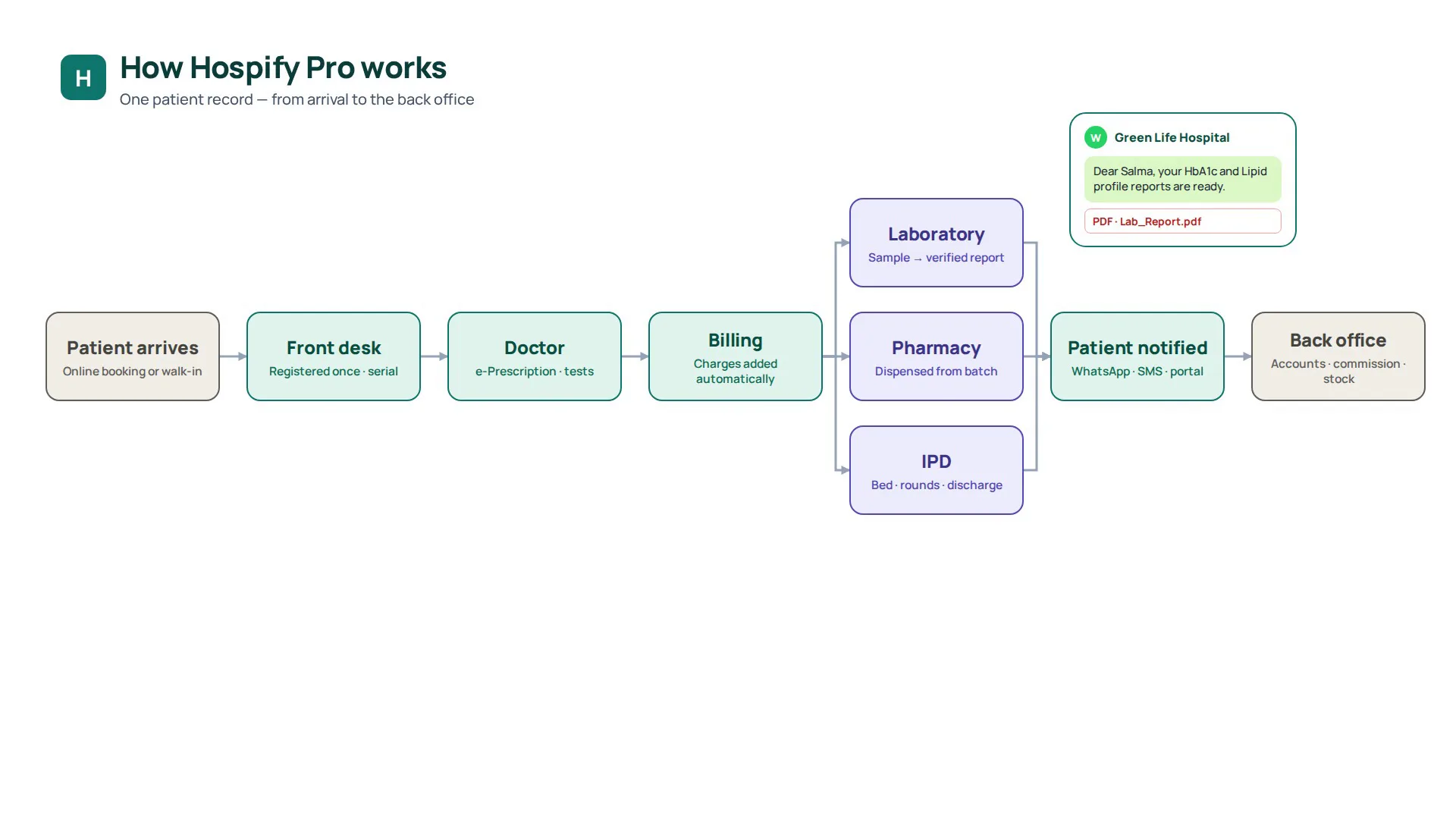
How Hospify Pro works
A 45-second walkthrough of one patient record in Hospify Pro: online booking or walk-in, front desk, doctor and e-prescription, automatic billing, laboratory, pharmacy and IPD, the patient notified on WhatsApp, and accounts, commission and stock updating by themselves.
 5:28
Diagnostic centre tutorial: Hospify Pro step by step
Set up a new diagnostic centre on Hospify Pro, then register patients, bill tests, book serials, collect samples, verify and deliver lab reports. 19 steps with screenshots and a 5-minute video.
 5:42
Doctor's chamber tutorial: Hospify Pro step by step
Set up your chamber on Hospify Pro, then book serials, take fees at the front desk, write e-prescriptions on your letterhead and follow up patients. 14 steps with screenshots.
 5:51
Dental chamber tutorial: Hospify Pro step by step
Turn on the dental prescription screen, mark teeth on the FDI tooth chart, add procedures per tooth to the bill, print the treatment plan — then run implants, smile makeovers and aligners as treatment cases with instalments, consents, lab orders and implant cards. With screenshots.
 3:40
Clinic and polyclinic tutorial: Hospify Pro step by step
Set up a clinic on Hospify Pro, book serials, take vitals, write prescriptions, order lab tests, bill patients and read your reports. Step-by-step guide with screenshots and a short video.
 3:00
Eye chamber tutorial: Hospify Pro step by step
Turn on the eye prescription screen, record vision and eye pressure for each eye, write eye drops by eye, print the glasses prescription for the optician and plan cataract surgery. With screenshots.
 2:41
Phone view & writing by hand tutorial: Hospify Pro step by step
Use Hospify Pro from your phone: see your line, call the next patient, repeat a returning patient's prescription in one tap and send it on WhatsApp. Or write the prescription by hand with a stylus. With screenshots.
 4:22
Pharmacy tutorial: Hospify Pro step by step
Set up a pharmacy on Hospify Pro, manage medicines, suppliers and stock, sell at the counter, handle customer credit and close the day. Step-by-step guide with screenshots and a short video.
 11:11
Hospital tutorial: Hospify Pro step by step
Set up a hospital on Hospify Pro: OPD, admission and IPD, emergency, operation theatre, lab, pharmacy, certificates, discharge and the final bill. Step-by-step guide with screenshots and an 11-minute video that follows one patient from OPD to discharge.
Modern care deserves modern software.
The team that built Hospify Pro is the same team that answers when you message. Open the live demo for your kind of facility, sign up for a 14-day free trial with no card, or ask us which modules fit the way you already work.
