
Patient registration and appointments, without the queue at the desk
The front desk is where a patient’s day starts and where most hospital software slows everyone down. Hospify Pro keeps the form short, the search instant and the queue visible, so receptionists spend their time on people rather than screens.
Hospify Pro front desk registers each patient once with a unique patient ID, finds returning patients by phone number with a duplicate check, books appointments with serial or token numbers, shows the live queue on a waiting-room TV, and accepts online bookings paid by bKash, Nagad or card with automatic SMS or WhatsApp reminders.
Everything front desk & appointments needs, on one patient record
One patient, one ID
Register once and the same patient ID follows the person to the doctor, the laboratory, the ward, the pharmacy and the cash counter. Search by phone number, name or ID; the duplicate check warns before a second record is created.
Serial and token numbers
Each doctor’s schedule issues serials automatically, by session and chamber. Walk-ins and online bookings share one list, so nobody is double-booked.
Queue display for the waiting room
A TV screen shows who is being seen and who is next, by doctor and room. Patients stop asking at the desk; the desk stops shouting names.
Online booking with payment
Patients book from your hospital website or patient portal and pay by bKash, Nagad or card. The serial number arrives by SMS or WhatsApp with a reminder before the visit.
Works when the internet does not
Registration, booking and billing continue offline and sync when the connection returns — no paper backup register required.
How front desk & appointments works, step by step
- Search the phone number — returning patient found in seconds
- Pick doctor and session — serial issued
- Collect the fee or confirm online payment
- Patient appears in the doctor’s queue and on the waiting-room screen
Availability: Included in every plan. Online booking with payment and queue display from Clinic. See pricing →
Who uses it
Diagnostic centres
Barcode samples, automatic worklist, verify-and-lock reports and WhatsApp delivery.
Learn moreClinics & polyclinics
Multi-doctor scheduling, online booking with payment, queue display and patient portal.
Learn moreDoctor chambers
For doctors who sit in more than one place: one account for every chamber, branded prescriptions and your own booking page — Tk 999.
Learn moreFront Desk & Appointments: frequently asked
Can patients book a doctor online and pay in advance?
Yes. Online booking is included from the Clinic plan. Patients pay by bKash, Nagad or card and receive their serial number and reminder by SMS or WhatsApp.
Does it stop duplicate patient records?
Yes. Patients are found by phone number, name or ID, and a duplicate check warns the receptionist before a second record is created.
Can one doctor run several chambers?
Yes. The Chamber plan covers one doctor with up to three chambers under one account, each with its own schedule and serial list.
Guides on this topic
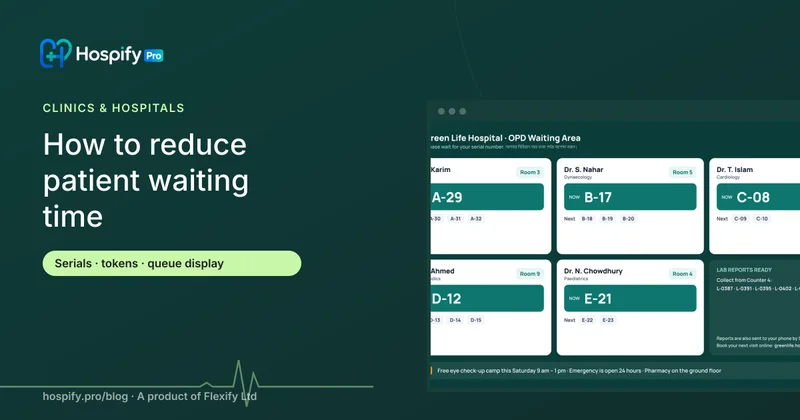
How to reduce patient waiting time in clinics and hospitals: serials, tokens and queue displays

Clinic management software in Bangladesh: what a multi-doctor clinic actually needs

Doctor chamber software in Bangladesh: e-prescriptions, serials and your own booking page
Modern care deserves modern software.
The team that wrote Hospify Pro is the team that answers when you message. Open the live demo for your kind of facility, sign up for a 14-day free trial with no card, or ask us which modules fit the way you already work.
