To reduce patient waiting time, let patients book a serial online and pay in advance, give each patient an estimated time rather than asking everyone to come at once, find returning patients by phone number instead of re-registering them, show the live queue on a waiting-room screen, and send prescriptions and reports to WhatsApp so nobody waits to collect paper. Clinic software such as Hospify Pro does all of this from the Clinic plan at Tk 3,500 / $79 a month.
In this guide 12 sections
- Where waiting time comes from
- 1. Give each serial an estimated time
- 2. Let patients book and pay online
- 3. Register once, find by phone number
- 4. Show the queue on a screen
- 5. Tell patients about delays
- 6. Remove the second and third queues
- 7. Measure it
- What it looks like with Hospify Pro
- A quick action plan for this week
- Next steps
- Frequently asked questions
Ask any patient what they dislike most about visiting a doctor in Bangladesh, and the answer is rarely the doctor. It is the wait: an hour or more in a crowded corridor, not knowing how many people are ahead, afraid to step out in case their name is called.
Long waits are not inevitable. Most come from a few fixable habits at the front desk. This guide sets out where waiting time comes from and the practical steps — with and without software — that cut it down.
Where waiting time comes from
Track one busy session and you will usually find the same causes:
- Everyone told to come at the start. Thirty patients arrive at 5 pm for a session that runs until 10 pm.
- Slow registration. Returning patients are registered again; details are written by hand.
- No visibility. Patients keep asking “How many before me?” — and the desk keeps answering.
- Doctor delays. The doctor arrives late or is called away, and nobody tells the waiting room.
- Second and third queues. After the consultation, patients queue again to pay for tests, and again to collect reports.
Each step adds minutes. Together they add hours.
1. Give each serial an estimated time
The single biggest improvement is simple: stop asking everyone to come at once. If a doctor sees about six patients an hour, serial 13 should be told to arrive around two hours after the session starts.
Good serial software does this for you — each serial number comes with an estimated time, sent by SMS or WhatsApp.
2. Let patients book and pay online
Online booking moves the queue from your corridor to the patient’s phone. Patients choose a doctor and session, pay by bKash, Nagad or card, and receive their serial and estimated time.
Paying in advance also cuts no-shows, so fewer slots are wasted and the doctor’s session runs to plan. Walk-ins and online bookings should share one list, so nobody is double-booked.
3. Register once, find by phone number
Re-registering a returning patient wastes minutes and creates duplicate records. With a unique patient ID and search by phone number, a returning patient is found in seconds, with a duplicate check that warns before a second record is created.
4. Show the queue on a screen
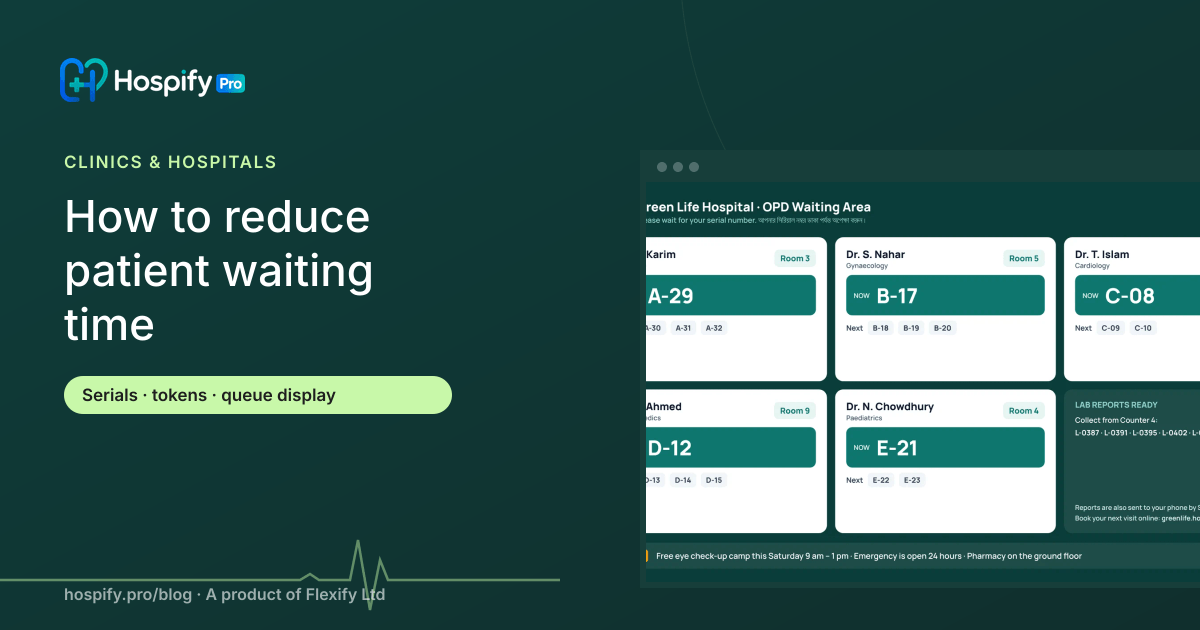
A queue display on a TV in the waiting area shows who is being seen and who is next, by doctor and room. The effect is immediate:
- Patients stop asking at the desk.
- Receptionists stop shouting names.
- Patients can step out for tea and come back in time.
- Delays are visible, which makes them easier to accept.
5. Tell patients about delays
If the doctor is running 40 minutes late, send a message to the patients with later serials. Most will happily arrive later rather than sit in the corridor.
6. Remove the second and third queues
After the consultation, the patient often waits again — to pay for tests, then to collect reports. Cut these out:
- Bill tests at the doctor’s desk or the nearest counter, with orders flowing straight from the prescription.
- Send prescriptions and reports to WhatsApp, so nobody comes back to collect paper. See how to send lab reports on WhatsApp.
- Accept mobile payments so change and receipts don’t slow the counter.
7. Measure it
You cannot improve what you do not measure. Track:
- Average wait from arrival to consultation, by doctor and session.
- No-show rate for walk-in and online bookings.
- Patients seen per hour, per doctor.
Review the numbers monthly and adjust session lengths and serial limits.
What it looks like with Hospify Pro
- The patient books online from your website or patient portal, pays by bKash, Nagad or card, and receives a serial number and reminder.
- At arrival, the receptionist finds them by phone number and marks them present.
- The queue display shows who is next for each doctor and room.
- The doctor sees the patient’s history and writes the prescription in under a minute.
- The prescription goes to the patient’s WhatsApp; ordered tests are billed in one step.
- Reports go to WhatsApp as soon as they are verified.
Serial and token booking are in every plan. Online booking with payment and the queue display are included from the Clinic plan (Tk 3,500 / $79 a month). See front desk and appointments.
A quick action plan for this week
- Count the patients who arrive in the first 15 minutes of a session.
- Start giving estimated times with every serial.
- Put a TV in the waiting room and show the queue.
- Offer online booking for one doctor as a pilot.
- Measure average waiting time before and after.
Next steps
- See Hospify Pro for clinics
- See front desk and appointments features
- See the live demo — the real software with sample data, no sign-up
- Book a free demo
Frequently asked questions
What causes long waiting times in clinics?
Usually everyone being told to arrive at the start of the session, slow registration at the desk, no visibility of the queue, doctors running late, and patients returning to the counter for bills and reports. Most of these are process problems that a serial system and software fix.
What is a token or serial system?
Each patient gets a number for a doctor's session, issued at the desk or online. Patients are called in order, and with a queue display they can see who is being seen and how many are ahead of them.
Do online bookings really reduce waiting?
Yes, when each serial comes with an estimated time. Patients arrive closer to their turn, the waiting room is less crowded, and paid bookings reduce no-shows.
What do we need for a queue display?
A TV or monitor in the waiting area connected to a small computer or smart TV browser. In Hospify Pro the queue display is a web page that shows the live queue by doctor and room.
Which Hospify Pro plan includes online booking and the queue display?
Both are included from the Clinic plan at Tk 3,500 / $79 a month. The Chamber plan includes serial and token booking for a single doctor.

Hospify Pro is built by Flexify Ltd for hospitals, diagnostic centres, clinics, doctors and pharmacies in Bangladesh and beyond. Our guides come from the questions owners and managers ask us every week. About us