
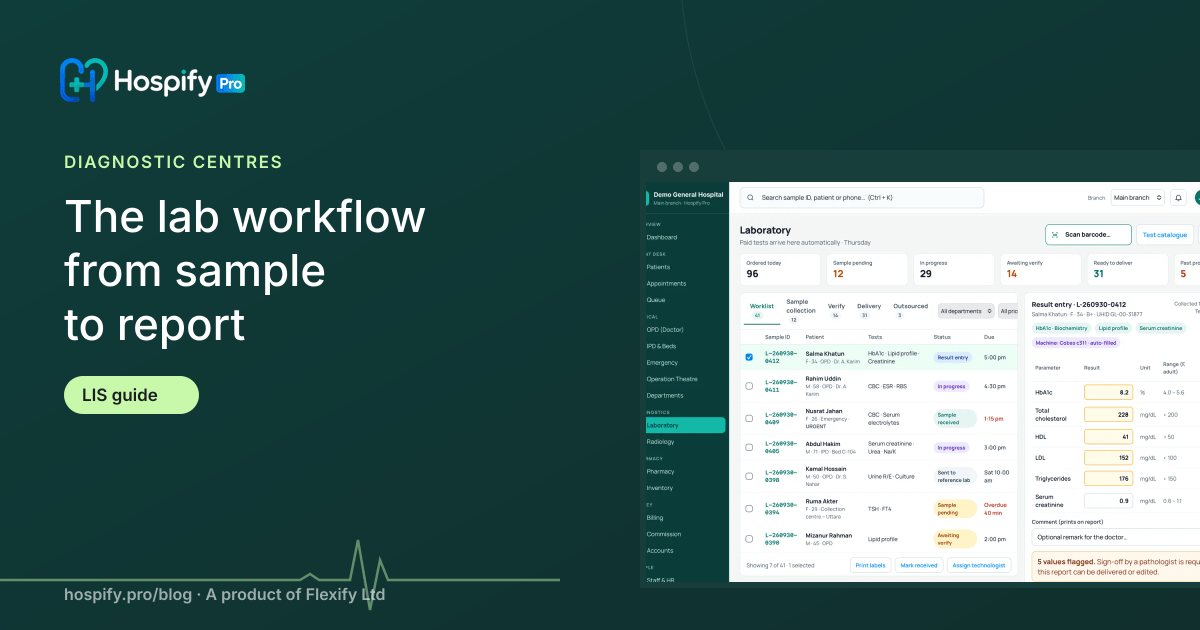
Diagnostic centre software, or a laboratory information system (LIS), turns every paid test into a lab worklist, labels each sample with a barcode, records results against reference ranges, lets the pathologist verify and lock the report, tracks turnaround time and delivers reports by print, WhatsApp, SMS and patient portal. Hospify Pro's Diagnostic plan does this for Tk 6,500 / $149 a month.
In this guide 14 sections
- The workflow at a glance
- 1. Registration and billing
- 2. Automatic worklist
- 3. Sample collection with barcode labels
- 4. Sample receipt in the lab
- 5. Result entry or analyser import
- 6. Verification and lock
- 7. Report delivery
- 8. Turnaround time and quality
- What diagnostic centre owners see
- Checklist for choosing diagnostic software
- What it costs
- Next steps
- Frequently asked questions
For a diagnostic centre, the laboratory is the business. Every delay, re-typed result or report handed to the wrong patient costs money and reputation. Yet many centres still run the lab on paper worklists, handwritten labels and reports typed into a word processor.
This guide walks through the complete lab workflow in modern diagnostic centre software — often called a laboratory information system (LIS) — step by step, and explains what to look for at each stage.
The workflow at a glance
- Registration and billing
- Automatic worklist
- Sample collection with barcode labels
- Sample receipt in the lab
- Result entry or analyser import
- Verification and lock
- Report delivery
- Turnaround-time and quality review
Each step feeds the next. Nothing is typed twice.
1. Registration and billing
The patient is registered once, with a unique patient ID and mobile number. Tests are selected from your test list — individually or as packages like a health check-up — and billed. The referring doctor or agent is recorded at the same time, so referral commission is calculated automatically later.
What to look for: fast search by test name or code, packages, discount limits by role, partial payment and dues, and payment by cash, card, bKash or Nagad.
2. Automatic worklist
As soon as tests are paid, they appear on the lab worklist for the right department — haematology, biochemistry, serology, microbiology, imaging. Nobody re-types test names from the invoice.
What to look for: department-wise worklists, urgent (STAT) flags, and visibility of each test’s status from billed to delivered.
3. Sample collection with barcode labels
The software prints a barcode label for each tube or container, showing patient name, ID and tests. The phlebotomist labels the samples at collection and scans them to confirm.
Why it matters: mislabelled or swapped samples are among the most serious lab errors. Barcodes make each sample traceable to the right patient and tests.
4. Sample receipt in the lab
Samples are scanned on arrival in the lab. Missing or rejected samples (haemolysed, insufficient, wrong container) are recorded with a reason, and the front desk can recall the patient.
What to look for: sample rejection reasons, and support for collection centres — samples collected elsewhere and transported to the main lab.
5. Result entry or analyser import
Technologists enter results against each test’s reference range (by age and sex where needed). Out-of-range values are flagged automatically. With analyser integration, results flow directly from the machine, removing re-typing errors entirely — see our analyser integration guide.
What to look for: reference ranges by age and sex, critical-value flags, formula-based calculated values, report templates for text-heavy reports (histopathology, imaging), and analyser integration.
6. Verification and lock
The pathologist or authorised senior technologist reviews and verifies each report. Once verified, the report is locked — it cannot be quietly edited. Corrections are made by an amended report, with the reason, user and time recorded in the audit log.
Why it matters: patients, doctors and owners need to know that what was printed is what is on record. Verify-and-lock is also the safeguard that makes automatic WhatsApp delivery safe.
7. Report delivery
Verified reports go out the way patients want them:
- Printed on your letterhead, with digital signatures.
- WhatsApp, as a PDF, automatically on verification.
- SMS, with a secure link, as a fallback.
- Patient portal, where reports can be downloaded again any time.
- The referring doctor can be notified too.
We cover this in detail in how to send lab reports on WhatsApp.
8. Turnaround time and quality
The software records the time at each step — billed, collected, received, resulted, verified, delivered. That gives you turnaround time (TAT) per test, department and shift, and shows exactly where delays happen.
What to look for: TAT reports, pending-test lists by age, and daily summaries for the lab manager.
What diagnostic centre owners see
Beyond the lab, owners want a clear daily picture:
- Tests done and revenue, by department and referrer
- Collections, dues and discounts, by cashier
- Turnaround time and pending reports
- Referral commission due
Hospify Pro shows all of this on the dashboard and in the reports centre. See laboratory and diagnostics features.
Checklist for choosing diagnostic software
| Must have | Nice to have |
|---|---|
| Automatic worklist from paid tests | Analyser integration |
| Barcode labels and sample tracking | Collection-centre logistics |
| Reference ranges and flags | AI-assisted report explanations |
| Verify-and-lock with audit log | Health packages and corporate billing |
| WhatsApp, SMS and portal delivery | Multi-branch comparison |
| Referral commission and discount control | |
| Works offline |
What it costs
Hospify Pro’s Diagnostic plan is Tk 6,500 a month (or $149) for 15 users and one branch. It includes everything in the Clinic plan plus the full lab workflow, radiology, collection centres, referral commission and report delivery to WhatsApp, SMS and portal. Setup — remote configuration, master-data import and online training — is Tk 10,000 / $199. Analyser integration is Tk 2,000 / $49 a month per analyser. See all plans.
Next steps
- See Hospify Pro for diagnostic centres
- See the live demo — the real software with sample data, no sign-up
- Book a demo to watch a sample go from barcode to WhatsApp
- Try the interactive demo
Frequently asked questions
What is the difference between an LIS and hospital management software?
A laboratory information system (LIS) manages the lab: worklists, samples, results, verification and reports. Hospital management software covers the whole facility, including registration, billing, OPD, IPD and pharmacy. Hospify Pro includes a full LIS inside the same system, so billing, lab and reports share one patient ID.
Can diagnostic centre software connect to lab analysers?
Yes, with analyser integration results flow directly from supported machines into the report, removing re-typing errors. In Hospify Pro this is a premium add-on at Tk 2,000 / $49 a month per analyser.
How does barcode sample tracking work?
When tests are billed, the software prints a barcode label for each sample tube. The label is scanned when the sample is collected and again when it is received in the lab, so every sample is traceable and matched to the right patient and tests.
Can reports be edited after they are printed?
They should not be. In good diagnostic software a verified report is locked. Corrections are made by issuing an amended report, with the reason, user and time recorded in the audit log.
Does it support collection centres?
Yes. Hospify Pro's Diagnostic plan supports collection centres, so samples collected at another location are tracked into the main lab and reports are released back to the patient and collection point.

Hospify Pro is built by Flexify Ltd for hospitals, diagnostic centres, clinics, doctors and pharmacies in Bangladesh and beyond. Our guides come from the questions owners and managers ask us every week. About us


